

Your Vending Machine Maintenance Checklist & Guide
There are two types of vending operators: those who wait for a problem and those who prevent it. Waiting for that dreaded call—the one about a broken machine, an unhappy location manager, and lost sales—is a stressful and expensive way to do business. A proactive approach, centered on consistent vending machine maintenance, is the secret to a calmer, more profitable operation. Instead of reacting to emergencies, you stay ahead of them. This guide will show you how to create a simple yet effective maintenance schedule that catches minor issues early, keeps your machines in peak condition, and protects your reputation as a reliable operator.
Key Takeaways
- Create a consistent maintenance routine: Break down your tasks into daily, weekly, and monthly checklists to stay ahead of issues, keep your machine inviting, and ensure consistent profits.
- Learn the warning signs and budget accordingly: Pay attention to strange noises, payment errors, and sales dips to catch problems early. Plan for repair costs like service calls and replacement parts to protect your bottom line from unexpected hits.
- Troubleshoot simple issues before calling a pro: Always check for basic problems like power connection issues or product jams first. Using smart monitoring tools can also give you real-time data to diagnose problems remotely and reduce downtime.
What Maintenance Does Your Vending Machine Need?
Keeping your vending machine in top shape is the secret to consistent profits and happy customers. Just like any other piece of hard-working equipment, it needs regular attention to run smoothly. By breaking down your maintenance into daily, weekly, and monthly tasks, you can stay ahead of potential issues and keep your machine looking its best. This simple routine protects your investment and ensures you’re offering a clean, reliable, and inviting point of sale.
Your Daily Checklist
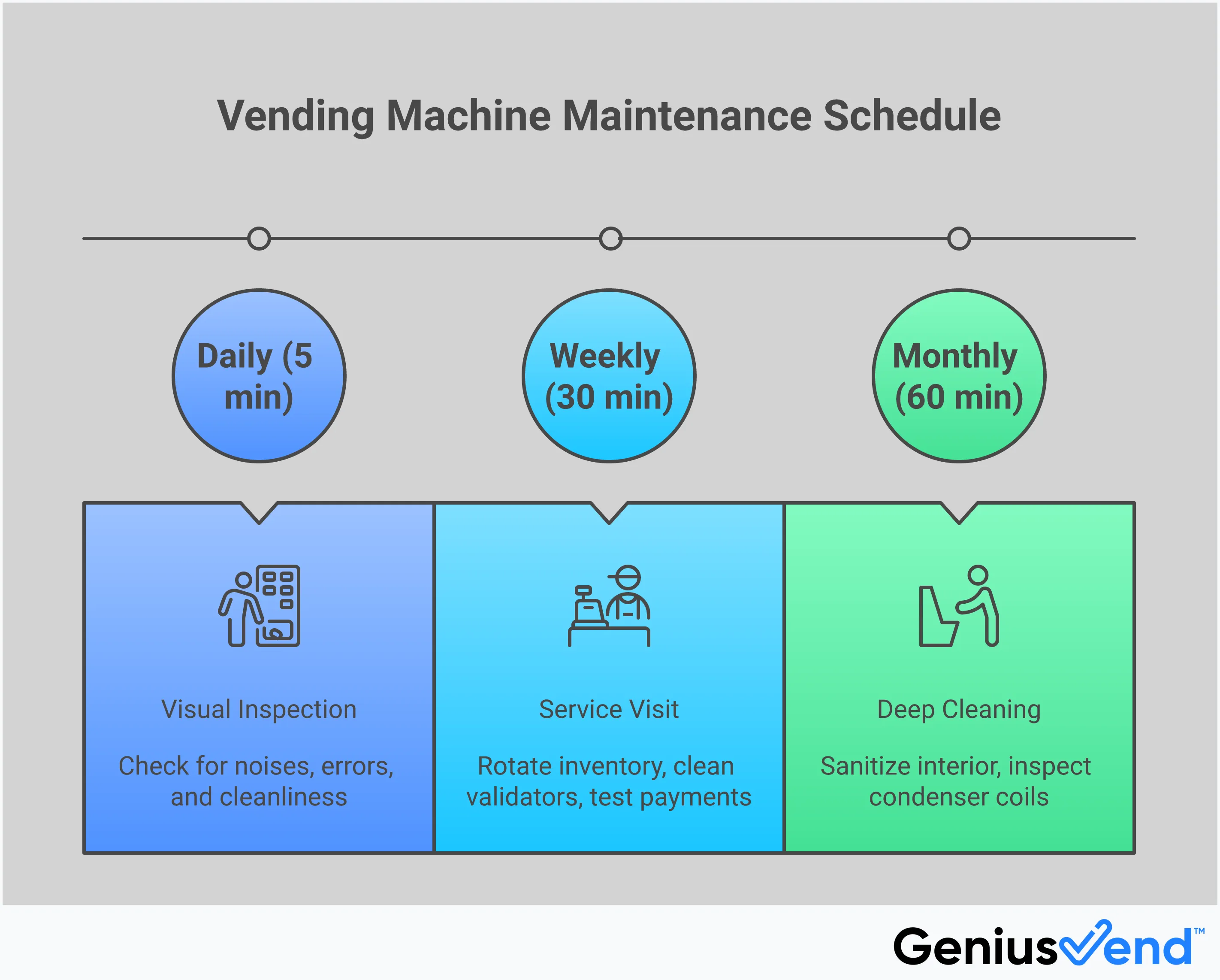
Every time you visit your machine, take a moment for a quick health check. This isn't about a deep clean; it's a simple inspection to catch problems early. Start by wiping down the front glass and any obvious smudges on high-touch areas. Then, do a quick visual scan and look for any signs of wear and tear, such as loose components or frayed wiring. Listen for any unusual noises that could indicate a problem with the cooling unit or dispensing mechanism. Finally, check that the machine is powered on and that the digital display is free of error codes. These small daily checks can prevent a minor issue from turning into a major headache.
Weekly To-Dos
Your weekly visit is the perfect time for restocking and a more thorough cleaning. As you refill your products, be sure to rotate inventory, moving older items to the front to ensure freshness. Wipe down all exterior surfaces and clean the payment systems, including the bill validator and card reader, to prevent jams or read errors. Following a consistent schedule for preventive maintenance helps you maintain efficiency, extend the life of your equipment, and keep your customers coming back. This is your chance to make sure the machine not only works perfectly but also looks inviting and well-cared-for.
The Monthly Deep Clean
Once a month, it’s time to give your machine a more intensive cleaning. A deep clean is essential for ensuring customer satisfaction, product quality, and the machine’s longevity. Start by unplugging the machine for safety and removing all the products. Using a food-safe cleaner, wipe down all interior surfaces, including shelves, trays, and the delivery bin. This is especially important for machines that vend fresh food or drinks. Pay attention to the condenser coils, which can collect dust and hinder cooling efficiency. A sparkling clean machine not only looks more appealing but also shows customers you care about their health and safety.
Using the Right Cleaning Supplies and Methods
Using the right tools for the job makes maintenance faster and more effective. Avoid harsh chemicals or abrasive sponges that could scratch surfaces or damage sensitive electronic components. Instead, assemble a dedicated toolkit with microfiber cloths, a food-safe all-purpose cleaner, glass cleaner, and small brushes for getting into tight corners. Having a comprehensive vending machine toolkit allows you to perform these tasks efficiently, ensuring your machines operate smoothly and continue to meet customer expectations. This preparation saves you time on-site and helps you deliver a consistently professional service.
How Often Should You Service Your Vending Machines?
Figuring out the perfect service schedule for your vending machines isn't a one-size-fits-all deal. The honest answer is: it depends. A machine in a bustling airport will need a lot more attention than one tucked away in a quiet office breakroom. The key is to move from a reactive mindset—fixing things only when they break—to a proactive one. Staying ahead of potential issues not only keeps your customers happy but also protects your profits and the longevity of your equipment.
Think of your service schedule as a flexible blueprint rather than a rigid set of rules. It should be based on your machine’s location, how much it’s used, and even the time of year. A well-maintained machine is a profitable one. Regular check-ins ensure your products are fresh, the machine is clean, and everything is in perfect working order. This consistent care builds trust with your customers and keeps them coming back for that convenient "Tap, Grab & Go" experience.
Create a Preventive Maintenance Schedule
The best way to avoid frantic, middle-of-the-night repair calls is to establish a solid preventive maintenance schedule. This is your routine for keeping everything running smoothly. Regular cleaning, inspections, and restocking are the foundation of this plan. By creating a simple checklist for daily, weekly, and monthly tasks, you can catch small problems before they become big, expensive ones. A consistent maintenance routine helps maintain efficiency, extends the life of your machine, and ensures you’re always meeting your customers' expectations with a clean, fully-stocked, and functional machine.
Adjusting for High vs. Low-Traffic Locations
Where you place your vending machine has the biggest impact on how often it needs service. A high-traffic location, like a college campus or a busy factory floor, means more sales, but it also means more wear and tear. For these machines, you’ll want to schedule more frequent visits to restock popular items and check for issues like coin jams or unresponsive screens. On the other hand, a machine in a low-traffic area might only need a weekly check-in. Pay attention to your sales data and customer feedback to find the sweet spot for each location.
The Advantage of Smart Monitoring
This is where modern technology makes your life so much easier. Smart vending machines, like the ones from Genius Vend, have changed the game by giving operators tools to monitor their routes remotely. Instead of driving to a machine just to find out it’s running low on one specific drink, you can get real-time updates sent straight to your phone. This IoT technology allows you to see sales data, inventory levels, and even error codes from anywhere. This significantly reduces unnecessary trips, downtime, and maintenance costs, letting you manage your business more efficiently.
Plan for Seasonal Changes
Customer cravings change with the seasons, and your service schedule should, too. During a summer heatwave, cold drinks and ice cream will fly off the shelves, meaning you’ll need to restock more often and pay closer attention to the cooling system. In the winter, customers might prefer hot beverages or warmer snacks. By anticipating these seasonal shifts, you can adjust your product mix and your maintenance frequency. A quick visual inspection and technical check-in during these periods can enhance your machine’s performance and keep your customers satisfied all year round.
Is Your Vending Machine Asking for Help? Watch for These Signs
Your vending machine can’t send you a text when it’s feeling under the weather, but it will give you clues. Learning to spot these early warning signs is the difference between a quick fix and a costly, sales-killing breakdown. Think of it as learning your machine’s language. Paying attention to the small things—a weird noise here, a sticky button there—helps you stay ahead of major problems, keeping your customers happy and your revenue flowing.
Ignoring these signals is like ignoring the check engine light in your car. Sure, you might make it a few more miles, but a serious issue is likely just around the corner. By regularly checking for these key indicators, you can address problems proactively. This approach not only saves you money on emergency repairs but also protects your reputation as a reliable operator. Let’s walk through the five biggest signs that your vending machine is asking for a little help.
Strange Noises and Mechanical Issues
You know what your machine sounds like during a normal vend—the whir of the motors, the gentle drop of a product. When you start hearing new, unusual noises, it’s time to pay attention. Grinding, clunking, or loud buzzing sounds are clear indicators that something is wrong internally. These noises could point to a failing motor, a misaligned part, or a jam in the dispensing mechanism. Don’t just turn up the music and hope it goes away. During your routine vending machine inspections, take a moment to listen. Also, look for physical signs of wear and tear, like frayed wiring or loose components, which can signal an impending failure.
Payment and Screen Glitches
Nothing frustrates a customer faster than a machine that refuses to take their money. If you notice an increase in failed transactions or get reports of payment issues, investigate immediately. This could be anything from a coin mechanism that repeatedly jams to a bill acceptor that rejects perfectly good bills. For more modern machines, watch for unresponsive touch screens or glitchy card readers. These payment system failures are direct barriers to a sale. A customer might try once or twice, but they’re unlikely to come back if the machine is known for being unreliable. Test all payment methods every time you service the machine to catch these problems early.
Temperature Alerts
For machines that sell refrigerated or frozen products, temperature control is non-negotiable. A machine that isn’t cooling properly is more than an inconvenience—it’s a food safety hazard. The most obvious sign is when drinks are lukewarm or frozen items feel soft. The machine might also feel warm to the touch, or you may see excessive condensation on the glass. These are red flags that the cooling unit is struggling or has failed. Maintaining the correct temperature is essential for ensuring product quality and protecting your customers. Modern smart machines can send an alert to your phone the second the temperature goes out of range, but for all others, a manual check during every visit is critical.
Fewer Sales or Failed Transactions
Sometimes, the most telling sign is the one you can only see in your sales data. If a typically high-performing machine suddenly shows a drop in sales, it might be signaling a hidden problem. This dip could be caused by an intermittent issue, like a card reader that only works half the time or a specific product coil that frequently jams. Customers rarely report these minor failures; they simply walk away, and you lose the sale. When a machine rejects money, it’s often because the bill acceptor is dirty or the coin changer is low on the correct change. Regularly tracking your analytics helps you spot these trends and investigate before a small issue becomes a major deterrent.
Cleanliness and Sanitation Concerns
A dirty machine doesn’t just look bad; it can be a symptom of a deeper problem. While smudges on the glass or dust on the shelves are simple cleaning fixes, other signs are more serious. Sticky residue in the delivery bin could indicate a leaking product or a spill that wasn’t properly cleaned. Unpleasant odors might point to spoiled products stuck inside the machine or even a pest problem. A clean machine builds customer trust and shows that you care about your business. Make a thorough cleaning part of every service stop. It improves the machine's appearance and gives you a chance to spot potential maintenance issues you might otherwise miss.
What Does Vending Machine Maintenance Cost?
Let’s talk numbers. Budgeting for maintenance is one of the most important things you can do to keep your vending business profitable. While the exact costs can vary based on your machine’s age, model, and location, understanding the potential expenses helps you plan ahead and avoid surprises. A major repair can feel like a huge setback, but if you’ve prepared for it, it’s just another part of doing business.
Think of maintenance costs in a few key categories: the labor to get a professional on-site, the price of any replacement parts, and the ongoing cost of regular upkeep. Breaking it down this way makes it much easier to create a realistic budget. The goal is to move from reactive, expensive emergency fixes to proactive, affordable care that keeps your machines running smoothly and your income flowing steadily. We'll explore each of these costs so you can build a solid financial plan for your vending operation and protect your profits from unexpected hits. This isn't just about fixing things when they break; it's about smart financial management that ensures the long-term health of your business. By anticipating these expenses, you stay in control of your cash flow and can make informed decisions about when to repair, upgrade, or replace your equipment.
Service Call and Labor Fees
When a problem is beyond a simple fix, you’ll need to call in a professional technician. The first cost you’ll encounter is the service call fee. Think of this as the charge for getting an expert to your machine's location to diagnose the issue. A typical service call might cost around $150, which often includes the first hour of labor. If the repair takes longer, you’ll likely be charged an hourly rate for the additional time, which could be about $75 per hour. These figures can change depending on your location and the technician’s experience, so it’s always a good idea to get a quote upfront.
The Cost of Replacement Parts
Beyond labor, the biggest variable in any repair is the cost of replacement parts. A simple fix like a new vend motor might be relatively inexpensive, but a major component failure can be a significant expense. For example, replacing a refrigeration compressor—a critical part for any cold drink or food machine—could cost over $800 for the part and shipping alone. When you add labor, a single major repair can easily top $1,300. This is why understanding your machine and having a financial cushion for potential repairs is so crucial for your business’s health.
Emergency Repairs vs. Regular Upkeep
There are two ways to approach maintenance: you can wait for something to break, or you can work to prevent it from breaking in the first place. Emergency repairs are always more expensive. Not only do you pay a premium for urgent service, but you also lose sales every minute your machine is out of order. Regular, preventive maintenance is an investment that pays for itself. Spending a little time and money on routine cleaning, calibration, and parts inspection will save you from those costly, middle-of-the-night breakdown calls and protect your revenue stream.
Understanding Warranties and Service Plans
A good warranty is your best defense against unexpected, high-cost repairs. When you buy a new machine, make sure you understand the warranty terms—what’s covered and for how long. A comprehensive warranty can save you thousands of dollars on a major part failure, like that expensive compressor we talked about. This is one of the biggest advantages of investing in new, high-quality equipment. Beyond the initial warranty, some providers offer extended service plans that can help you budget for maintenance with a predictable monthly or annual fee, giving you peace of mind and protecting your bottom line.
What to Do When Your Vending Machine Malfunctions
Even the most reliable machine can have an off day. When your vending machine acts up, it’s easy to feel a surge of panic, but don’t worry. Most issues have simple solutions you can handle yourself. The key is to approach the problem calmly and systematically. Before you pick up the phone to call a technician, there are a few steps you can take to diagnose and potentially fix the issue on the spot. Walking through a quick troubleshooting process can save you time, money, and a lot of stress, getting your machine back to serving customers and generating revenue as quickly as possible.
First Steps for Troubleshooting
Before you do anything else, take a moment to perform a quick visual inspection. Often, the problem is something you can spot right away. Check for any obvious obstructions in the product delivery chute or the payment slots. Sometimes a stray item or debris is all it takes to cause a jam. Look for any visible signs of wear and tear, like loose wires or damaged components, especially around the door and payment systems. Listen for any unusual noises, like grinding or buzzing, that could point you toward the source of the problem. A careful once-over can often reveal the culprit without you ever needing to open a toolbox.
Try a Simple Reset
When in doubt, the old "turn it off and on again" trick works wonders. Power issues are one of the most common causes of machine malfunctions. First, check the basics: Is the machine securely plugged into the wall? Is the outlet itself working? You can test it by plugging in something else, like your phone charger. Also, check your location’s circuit breaker to make sure it hasn’t been tripped. If the power source is fine, try a full power cycle. Unplug the machine, wait about 60 seconds to let the internal components fully reset, and then plug it back in. For smart machines like Genius Vend, you can often check the machine’s status or perform a reset directly from your operator app, saving you a trip.
When to Call a Pro
While many issues are simple fixes, some problems are best left to a professional. If your machine is consistently rejecting bills or coins, the payment acceptors might be faulty or need recalibration. Complex mechanical jams, refrigeration or freezer failures, or persistent error codes that don’t clear after a reset are also signs that you need an expert. Tampering with complex electrical components or sealed cooling systems can be dangerous and may void your warranty. Issues with payment systems, in particular, often require help from an expert to avoid causing more damage. Knowing when to step back is just as important as knowing how to troubleshoot.
How to Reduce Downtime and Protect Your Profit
The best way to handle malfunctions is to prevent them from happening in the first place. A consistent preventive maintenance schedule is your single most powerful tool for reducing downtime. Regular cleaning, restocking, and inspections help you catch small issues before they become costly repairs. This is where smart vending machines truly shine. With remote monitoring, you get real-time alerts for temperature fluctuations, sales dips, or system errors, allowing you to address problems proactively. Instead of waiting for a customer to report an issue, your operator app tells you exactly what’s going on, helping you maintain efficiency and keep your customers happy.
Related Articles
- Combo Vending Machine 101: The Ultimate Guide
- How & Where to Buy a Vending Machine in 2025
- How to Buy a Vending Machine: A Starter Guide
- Where to Buy a Vending Machine: The Ultimate Guide
- Auto Vending Machine Business: The Ultimate Guide
Frequently Asked Questions
If I'm short on time, what's the one maintenance task I absolutely can't skip? Without a doubt, focus on the payment systems and overall cleanliness. A machine can be fully stocked with the best products, but if it can't accept a customer's money or looks dirty, you won't make a sale. Wiping down the bill validator and card reader during every visit prevents frustrating transaction errors, and a quick clean of the glass and high-touch surfaces makes the machine look trustworthy and inviting.
How much time should I realistically set aside for servicing each machine? The time you'll spend really depends on the machine's location and how busy it is. A quick daily check might only take a few minutes. For a weekly restock and cleaning at a moderately busy spot, you can plan for about 20 to 30 minutes. Your monthly deep clean will be more involved, likely taking around an hour. The key is to be efficient by having your supplies ready to go when you arrive.
Can I handle most repairs myself, or do I always need to call a professional? You can definitely handle the basics yourself. Things like cleaning jams, restocking, and simple troubleshooting like power cycling the machine are all well within your control. However, you should call a technician for more complex issues, especially those involving the refrigeration unit, internal wiring, or persistent payment system failures. Trying to fix these without experience can cause more damage or even void your warranty.
How do smart vending machines actually make maintenance easier? Smart machines are a game-changer because they let you see what's happening without being physically there. Instead of driving to a location just to check inventory, a smart machine sends real-time data to an app on your phone. You'll get alerts for low stock, temperature issues, or system errors, so you can plan your service routes more efficiently and show up already knowing exactly what the machine needs.
Does a brand-new machine really need as much maintenance as an older one? While a new machine is less likely to have issues from wear and tear, it absolutely still needs a consistent maintenance routine. Regular cleaning and inspections are essential from day one to keep it running perfectly and to protect your investment. Think of it like a new car; you still need to do the oil changes and keep it clean to ensure it has a long, reliable life. Sticking to a schedule right from the start builds good habits and prevents future problems.
