

What Is a Best Buy Vending Machine? A Guide
When you think of a vending machine, you might still picture a clunky box that dispenses snacks and occasionally eats your dollar. However, automated retail has evolved far beyond that. The Best Buy vending machine is a prime example of this modern shift, acting as a sophisticated, tech-forward storefront. With interactive touch screens, secure cashless payment options, and real-time inventory management, these kiosks offer a seamless and reliable customer experience. They show how smart technology can effectively sell high-value items like electronics without a human attendant. Here, we’ll explore the advanced features that power these machines and what they signal for the future of vending.
Key Takeaways
- Shop Smartly Before You Tap: Treat the transaction like a final sale. Use the machine's touchscreen to carefully check product details and compatibility, and be aware of the strict, unopened-only return policy before you buy.
- Convenience Comes with a Plan: These kiosks are designed for tech emergencies in places like airports. While they offer trusted products, it's wise to do a quick price check on your phone and have your payment method ready for a smooth transaction.
- Know How to Handle Glitches: If a problem occurs, don't walk away. Note the machine's ID number and immediately call the customer service phone number listed on the kiosk to get the issue resolved efficiently.
What is a Best Buy Express Vending Machine?
Imagine you’re at the airport and realize you forgot your phone charger or headphones. Instead of panicking, you spot a familiar blue and yellow kiosk. That’s a Best Buy Express vending machine. Think of it as a high-tech version of the classic snack machine, but instead of chips and candy, it’s stocked with essential electronics. These automated retail kiosks offer a curated selection of popular tech products, allowing you to grab what you need on the go.
The concept is simple: provide convenient access to electronics in high-traffic locations where a full-sized store isn't practical. You get the same trusted products you'd find in a Best Buy store, but with the speed and ease of a vending machine. It’s a brilliant solution for last-minute tech needs, whether you're a traveler, a student, or just someone who needs a new gadget right away. These machines are a great example of how automated retail is changing the way we shop.
How Do They Work?
Using a Best Buy Express machine is incredibly straightforward. You simply walk up to the kiosk, browse the available products on the screen, and make your selection. Once you’ve decided what you want, you pay with a credit card, and the machine dispenses your item. It’s a quick, seamless process designed for people in a hurry.
One of the biggest advantages is that you’re buying from a brand you already trust. The prices are typically the same as what you’d find in a regular Best Buy store, which means you can avoid the price markups often found in airports and hotels. This combination of convenience, trust, and fair pricing makes them a popular choice for travelers and busy shoppers.
What Can You Buy?
The product selection in a Best Buy Express machine is carefully chosen to meet the immediate needs of people on the move. While the inventory has evolved over the years, you can consistently find essentials like phone chargers, power banks, and a variety of headphones, from earbuds to noise-canceling models.
You might also find popular gadgets like GoPro cameras, portable speakers, and even personal care items like electric razors. When these machines first launched, they were stocked with iPods and digital cameras. Today, the focus is on accessories for the devices we already carry. This smart inventory management ensures the products are always relevant to what customers need most.
How to Pay (and Keep Your Info Safe)
Paying at a Best Buy Express machine is just as easy as using one. They accept all major credit and debit cards, making the transaction quick and familiar. For even more convenience, most kiosks are equipped with modern cashless payment systems, allowing you to use mobile payment options like Apple Pay or Google Pay. Just tap your phone or smartwatch, and you’re good to go.
These machines use secure, encrypted payment terminals to protect your financial information, so you can feel confident that your data is safe. The process is designed to be as secure as any other retail credit card transaction, giving you peace of mind while you make your purchase.
Busting Common Myths About Electronics Vending
There’s a common misconception that all vending machines are old, clunky, and unreliable. However, Best Buy Express kiosks prove that modern vending is anything but outdated. These machines are sophisticated, tech-forward retail solutions. They feature bright touch screens, secure payment options, and reliable dispensing mechanisms designed specifically for delicate electronics.
Forget the days of your snack getting stuck. These machines are built to handle everything from a small charging cable to a boxed pair of headphones with care. They represent the future of unattended retail, showing how automated systems can provide a high-quality shopping experience anytime, anywhere.
Where Can You Find a Best Buy Express Machine?
You won’t find a Best Buy Express machine on every corner, and that’s by design. These smart kiosks are placed in strategic, high-traffic locations where customers are most likely to need immediate access to electronics. Think of places where you might have a sudden "uh-oh" moment, like realizing you left your headphones at home right before a long flight. The entire concept is built around convenience, offering a lifeline when you can't get to a traditional store.
The most common spots are bustling travel hubs, where thousands of people pass through daily. Best Buy has identified a specific need in these environments: travelers often forget or break essential tech accessories and need a reliable replacement fast. By placing machines right in the flow of foot traffic, they provide a simple solution from a brand people already know and trust. This targeted placement is a key lesson for any vending operator—it’s not just about what you sell, but where you sell it. Finding the right location is crucial for meeting customer needs and ensuring your machine gets seen and used.
Check Airports and Transit Hubs
Your best bet for finding a Best Buy Express machine is at a major airport. For over a decade, these kiosks have been a welcome sight for travelers who’ve forgotten chargers, need noise-canceling headphones for a flight, or want a portable speaker for their vacation. They offer a huge advantage over typical airport shops by providing electronics from a trusted brand at standard retail prices. This means you can avoid the usual airport price markups and get the same product you’d find in a regular Best Buy store. You can also find them in other major transit hubs where people are on the move and in need of quick tech solutions.
Know Their Operating Hours
One of the biggest perks of automated retail is its round-the-clock availability, and Best Buy Express machines are no exception. In airports, these kiosks are open 24 hours a day, seven days a week. This is a game-changer for anyone with a red-eye flight or an unexpected travel delay outside of normal business hours. While other airport stores are closing up for the night, the vending machine is always ready to go. You can grab a new pair of earbuds at 5 a.m. or a portable battery at midnight without having to wait for a store to open, offering true convenience on your schedule.
Use the Official Store Locator
While there isn't a single, universal map for every machine in the US, the best way to confirm a location ahead of time is to check online resources. For travelers in Canada, Best Buy offers a helpful guide to its kiosks, which are located in most major airports across the country. You can find a Best Buy Kiosk and see which terminals they’re in before you even leave for your trip. A quick search for your specific airport and "Best Buy Express" can also yield helpful results from the airport’s own directory, ensuring you know exactly where to go once you get there.
A Look at the Smart Features
Long gone are the days of clunky buttons and hoping your dollar bill is crisp enough to be accepted. Modern electronics vending machines, like the Best Buy Express kiosks, are packed with technology that makes buying on the go simple, secure, and surprisingly sophisticated. These aren't just boxes that dispense products; they're fully integrated retail points designed for the modern consumer.
Understanding these features helps you see why this model is so successful. For customers, it means a better, more reliable experience. For entrepreneurs and business owners, it showcases the power of smart vending to meet customer needs and operate efficiently. From interactive displays to advanced payment options, these machines have completely changed what’s possible in automated retail. Let's break down the key features that make them work so well.
Easy-to-Use Touch Screens
The first thing you’ll likely notice about a modern electronics vending machine is its large, bright touch screen. Instead of squinting at tiny product images behind glass, you can browse a digital catalog with high-resolution photos, detailed descriptions, and pricing, all in one place. These interactive displays allow you to easily navigate through categories and make your selection with a few simple taps. This intuitive, user-friendly interface feels more like shopping on a tablet than using a traditional vending machine, creating a more engaging and convenient user experience. It removes the guesswork and makes finding what you need quick and painless.
See What's in Stock Instantly
There’s nothing more frustrating than selecting an item only to find out it’s sold out. Smart vending machines solve this problem with real-time inventory tracking. The touch screen display shows you exactly what’s available before you even start the payment process. This transparency is a huge win for customer satisfaction. Behind the scenes, this technology is also a massive benefit for the machine’s operator. The system automatically sends alerts when stock is low, allowing for efficient restocking and ensuring popular items are always available. This real-time data is crucial for keeping the machine profitable and running smoothly.
Climate Control for Electronics
You wouldn’t leave your laptop in a hot car, and the same principle applies to the products in a vending machine. Electronics are sensitive to extreme temperatures, which can damage batteries and internal components. That’s why specialized machines like the Best Buy Express kiosks are equipped with climate control systems. This feature maintains a stable internal temperature, protecting the gadgets inside from heat, cold, and humidity. It ensures that the headphones, charging cables, or travel adapters you buy are in perfect working condition, just as if you’d picked them off a shelf in the store.
Security Features to Protect Your Purchase
Buying a pricey gadget from a machine can feel like a leap of faith, but these kiosks have multiple security features to protect both the products and your purchase. The machines themselves are built to be durable and tamper-resistant, keeping the high-value inventory safe. During the transaction, secure vending mechanisms ensure your item is dispensed correctly. Many of these machines also have specific return policies, like Best Buy’s, which allow you to return an item if it’s defective or unopened. This policy adds a layer of consumer protection and gives you confidence that you won’t be stuck with a faulty product.
Pay Your Way with Mobile Options
Fumbling for cash is a thing of the past. Smart vending machines offer a full suite of modern payment options to make transactions as seamless as possible. You can typically pay with a credit or debit card, but most also support contactless payments. This means you can use Apple Pay, Google Pay, or simply tap your NFC-enabled phone or card to complete the purchase in seconds. Offering these flexible payment methods meets the expectations of today’s consumers, who value speed and convenience above all else. It’s a small touch that makes a huge difference in the overall customer experience.
How to Make a Smart Purchase
Okay, you’ve found the machine and spotted the perfect gadget. Before you pull out your wallet, taking a few extra moments can save you from a potential headache later. These machines are incredibly convenient, but they operate a little differently than a traditional store. Thinking through your purchase beforehand ensures you walk away happy with your new tech and the experience. Here’s how to be a savvy shopper, even when you’re in a hurry.
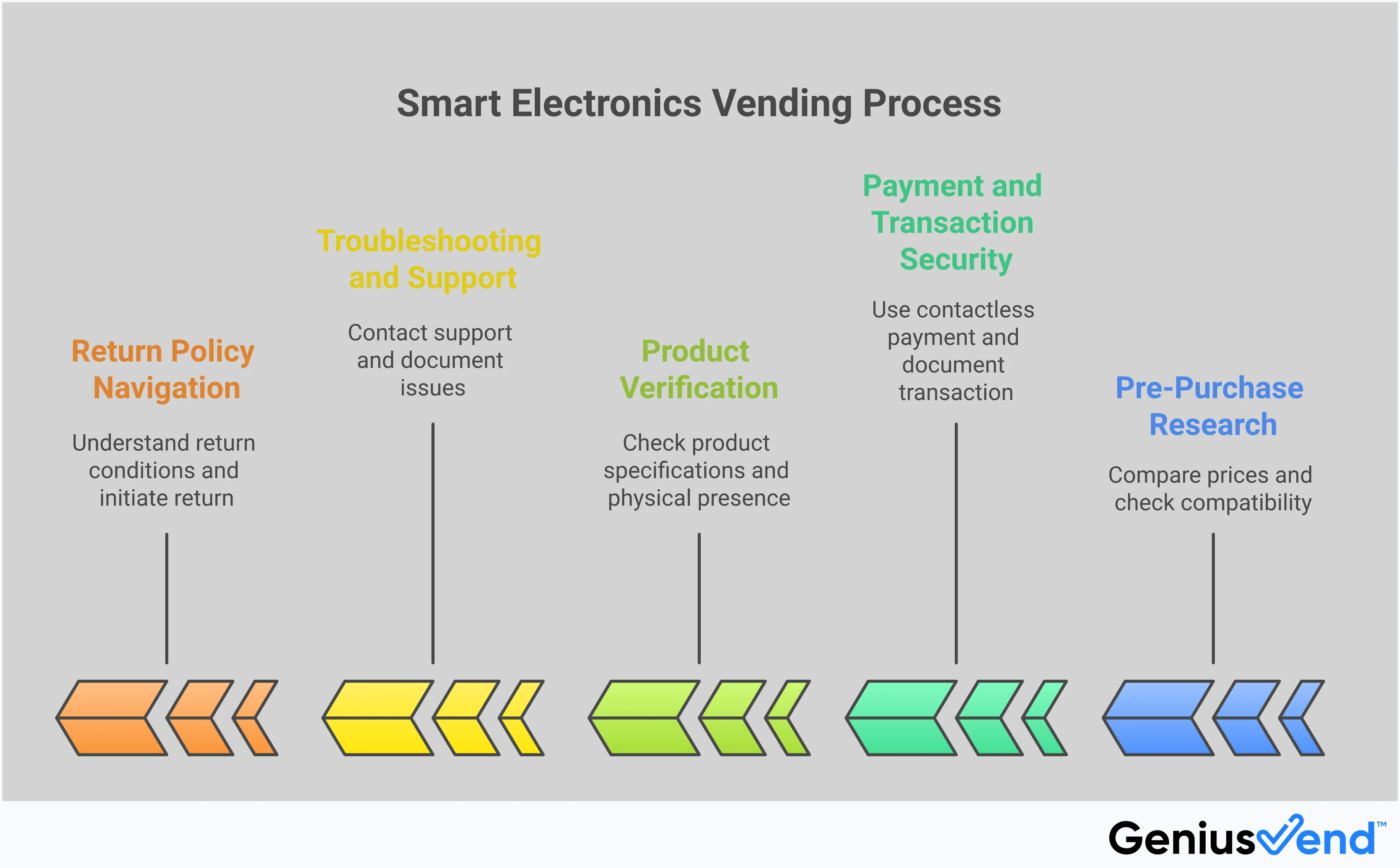
Compare Prices Before You Buy
The biggest trade-off for convenience is often the price. Items in a Best Buy Express machine might cost more than they do in a regular Best Buy store or online. Before you commit, do a quick search on your phone for the same item. You might find it cheaper elsewhere. The good news is that Best Buy sometimes offers a price match guarantee on items, even from their kiosks. This could mean you can claim the price difference later by contacting customer service. It takes an extra step, but it can put money back in your pocket.
Check the Specs: What to Look For
Not all headphones or charging cables are created equal. Since you can’t ask a sales associate for help, the machine’s touchscreen is your best friend. Use it to carefully read the product details. Check the model number, compatibility (is it for iPhone or Android?), and key features. Are those earbuds Bluetooth 5.0? Does that power bank have enough juice to charge your tablet? These machines are often stocked with travel-friendly items, which might mean they are smaller or have different features than standard models. Taking a minute to read the specifications ensures you’re getting exactly what you need for your devices.
What's the Return Policy?
This is one of the most important things to know: the return policy for these machines is very strict. Unlike a regular store purchase, you generally can't return an item just because you changed your mind. According to reports, you can typically only make a return if the product is completely unopened or defective. Even then, you can’t just walk into a Best Buy store. You’ll likely need to call a specific customer service number to start the process. Because of this less-flexible return policy, it’s best to be 100% sure about your purchase before you buy.
Tips for a Quick and Easy Transaction
These machines are designed for speed, and you can make the process even smoother. First, have your payment method ready. They accept most major credit and debit cards, and many are equipped for contactless payments like Apple Pay or Google Pay, so you can just tap your card or phone. Before you start, take a quick look at the machine itself. Make sure the screen is responsive and there are no error messages. It’s also a good idea to visually confirm that the item you want is physically in its slot. This simple check can help you avoid any snags and get you on your way faster.
What to Do if Something Goes Wrong
Even with the most advanced technology, hiccups can happen. Maybe the product you wanted didn't dispense, or you were charged incorrectly. It’s frustrating, but there’s always a solution. If you run into an issue at a Best Buy Express machine, the key is to know what steps to take right away. Here’s a straightforward guide to help you sort out any problems quickly and get the help you need.
Your Step-by-Step Buying Guide
First, don't panic or walk away from the machine. Take a moment to assess the situation. Look at the screen for any error messages and snap a quick photo of it, along with the machine’s identification number (usually on a sticker). This information will be crucial when you contact support. Next, check your credit card app or bank account to see if the transaction went through. Whether you were charged or not, having this proof is helpful. With your photos and transaction details ready, you can confidently reach out to customer service to get the issue resolved.
Understand Your Warranty
It’s important to know that Best Buy Express machines have a very specific return policy. You can generally only return an item if it’s defective or still in its unopened packaging. This isn't like shopping in a regular store where you can change your mind after opening the box. If you receive a faulty product, you'll need to call a toll-free number to start the return process. As one customer's experience shows, knowing the policy beforehand can save you a lot of headaches. Always be sure of your purchase before you complete the transaction.
How to Get Help at the Machine
If you need immediate assistance, Best Buy has a system in place. You aren't left stranded. Your best bet is to call their dedicated customer service line, which is usually displayed on the machine itself. For easy reference, the number is 1-866-BEST-BUY (1-866-237-8289). They also offer a 24/7 live chat service on their website, which can be a great option if you prefer texting over calling. Having these contact methods available means you can report an issue on the spot. Best Buy provides support specifically for these kiosks, so don't hesitate to reach out.
Quick Fixes for Common Issues
While it’s easy to assume the machine is broken, the problem is often simpler. There are many common myths about vending machines, but modern kiosks are quite reliable. If a transaction fails, first double-check your payment method. Did you tap your card correctly, or is there an issue with your chip? Sometimes, simply trying a different card can solve the problem. The machine might also be out of the specific item you selected. The screen should tell you if an item is out of stock, but it's always worth checking. These quick checks can often resolve the issue without needing to call for help.
Related Articles
- Vending Machine with Touch Screen: Buyer's Guide
- Vending Machine for Sale: A Buyer's Guide for 2025
- AI Vending Machine: Your Ultimate Business Guide
- How to Buy a Vending Machine: A 7-Step Guide
- Where Can I Buy a Vending Machine? A 2025 Guide
Frequently Asked Questions
Are the prices at a Best Buy Express machine the same as in the store? Generally, the prices are set to match standard retail, which is a huge plus, especially in places like airports where things are usually marked up. However, it's always a smart move to do a quick price check on your phone before you buy, just in case a sale is happening online or in-store that the kiosk hasn't caught up with.
What should I do if the machine doesn't dispense my item after I pay? Don't walk away! The first thing you should do is take a picture of the machine's screen and its ID number, which is usually on a sticker. Then, call the customer service number listed on the kiosk. Having that information ready will make it much easier for them to help you sort out the charge and get a refund.
Can I return an item from the kiosk to a regular Best Buy store? Unfortunately, no. The return process for these machines is separate from the main stores. You can typically only return an item if it's defective or completely unopened, and you have to start the process by calling a specific customer service number. It's best to be absolutely sure about your purchase before you tap your card.
How can I be sure the electronics inside aren't damaged? These machines are designed specifically to handle delicate electronics. They have climate control systems to protect gadgets from extreme temperatures and use secure dispensing mechanisms that handle each item with care. You can be confident that the product you receive is in the same condition as one you'd pick up from a store shelf.
Where can I find these machines besides airports? While airports are the most common location, you might also spot them in other major travel and transit hubs where people are constantly on the move. The strategy is to place them in high-traffic areas where someone might have an urgent need for tech. Think of large train stations or busy convention centers as other potential spots.
